


Vizo Lite
4.6687.00 Reviews
App Specs
- Version
- 1.30
- Updated On
- License
- Free
- Downloads
- 1,000,000+
- Developer
- Didik Hadist Lee
- Categories
- Tools
- Platform
- Android
Screenshots
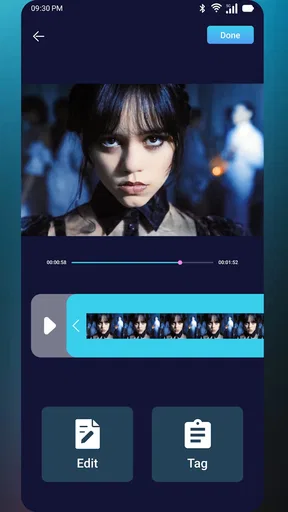
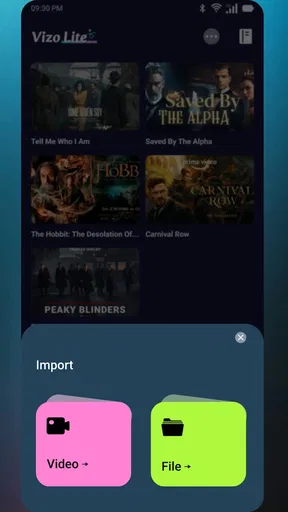
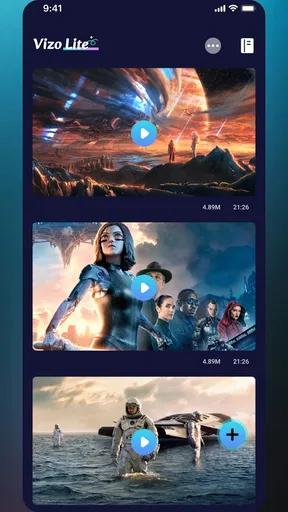
 Analysis by AppCompare
Social apps can make a small task feel surprisingly repetitive: finding a video, trimming it to the length you want, then keeping track of the likes connected to your own content. I look for a tool that reduces those little interruptions rather than adding another complicated routine. Vizo Lite is a free utility app from Didik Hadist Lee, focused on shortening your videos and managing likes. That narrow purpose is its appeal: it is aimed at people who want a practical helper for their own videos, not a full editing studio or an all-purpose social dashboard.
The first useful question is whether that simple promise fits your routine. If you often need a shorter version of a clip before sharing it, or want a more organized way to handle likes, a focused tool may save time compared with opening a larger editor or juggling several steps in a social app. If you rarely edit your own videos, however, installing another utility may not remove enough friction to be worthwhile.
Where a focused tool can save time
For a realistic example, imagine recording a longer clip at a family gathering and wanting to share just the moment when everyone starts laughing. A dedicated shortening workflow can help you concentrate on that one task instead of navigating a broad editor full of options you may not need. I would still watch the result before sharing: a trim that starts too late can lose the context, while one that ends too early can make a moment feel abrupt.
That final check is especially useful when the video contains speech, movement, or a change in scene. I’d replay the shortened version from beginning to end and make sure the opening makes sense on its own. This small habit can prevent a quick edit from becoming a second round of edits later, which is where a supposedly time-saving tool can otherwise create extra work.
Choosing it over a general editor
Compared with a usual video editor, a lightweight utility is most attractive when the job is limited to shortening a clip and handling likes. A full editor makes more sense when you need several layers of changes, detailed effects, or a carefully composed final video. Vizo Lite’s focused role is better suited to quick, repeatable tasks than to building a polished project from many pieces.
There is a trade-off in choosing a narrow tool: fewer decisions can make a simple task feel faster, but the app should not be mistaken for a replacement for every editing need. Before relying on it for a time-sensitive post, try it with a nonessential clip and see whether its workflow matches how you choose start and end points. That quick test tells you more than assuming that every trimming tool handles clips in the same way.
Getting Started with Vizo Lite
First things first, downloading Vizo Lite is a breeze. Whether you’re on Android or iOS, it’s just a quick tap away on your app store. Once installed, you’re greeted with a clean and intuitive interface. The app isn’t cluttered, which I appreciated right off the bat. It’s designed to get you straight to the content without any fuss.
Worth Reading Before You Choose

EA SPORTS FC Mobile 26 Is a Bigger Football Game, but It Takes Time

Flipboard Shows What News Apps Must Do Beyond the Feed

Switching to Android Auto Means Rethinking Your Driving Routine

Google Calendar Makes a Crowded Week Easier to Manage

Ludo King Makes the Most of the Minutes Between Plans

Baby Panda World Brings Quick Play to Modern Phones, but Its Game Library Feels Busy
Setting up your preferences is as easy as pie. You can choose your topics of interest, and the app will curate news bites tailored just for you. The personalization aspect is quite nifty, letting you focus on what truly matters to you, whether it’s world politics, tech trends, or the latest in celebrity gossip.
The Content Experience
Now, onto the meat of the app—the content. Vizo Lite offers news in bite-sized formats, perfect for those moments when you’re waiting in line or sipping your morning coffee. Each piece is concise, delivering the essentials without overloading you. It’s like having a knowledgeable friend giving you the day’s highlights.
The app updates regularly, so you’re always in the loop. I found the variety in topics refreshing, and the updates are frequently enough to keep things interesting but not so often that it becomes overwhelming. It strikes a nice balance between information and brevity.
Usability and Features
One of the standout features for me was the offline mode. Life doesn’t always happen with Wi-Fi, and Vizo Lite gets it. You can save articles to read later, which is a lifesaver during commutes with spotty internet. It’s a small feature, but it makes a world of difference.
Navigation is a breeze, with a simple swipe taking you from one story to the next. There’s no complex menu system to decipher, which is a relief. The app is designed with efficiency in mind, making it ideal for users who want quick access to news without jumping through hoops.
Daily workflow and practical checks
In a typical week, the most sensible way to use a video-shortening tool is to treat it as the quick step between recording and sharing, rather than as a place to build the whole post. I’d choose the clip with a clear purpose, make the cut, then view it once on the device where I plan to share it. That second look helps catch an awkward opening or an ending that cuts off a reaction. It is a useful habit even when the edit itself is simple.
Like management is a different kind of task from trimming. If you are keeping tabs on engagement across your own videos, it helps to decide what you actually want to track before opening the app: perhaps you are checking whether a particular post is getting attention, or reviewing likes while planning what to share next. A quick, consistent check is more useful than repeatedly dipping into the app without a reason. The practical benefit depends on whether its like-related tools fit the way you already manage your posts.
One non-obvious trade-off is that a single-purpose utility can reduce the number of steps without replacing judgment. It can help with the mechanics of shortening a clip, but you still need to decide what part is worth keeping and whether the finished cut works for its audience. I would avoid trimming solely to make a video shorter; preserving enough context often matters more than removing every pause.
Who is likely to get the most from it?
I’d consider this app if I regularly share my own videos, prefer a straightforward tool for making them shorter, and want a dedicated place for managing likes. It may also suit someone who does small edits on a phone and finds broad editing suites distracting for routine jobs. The free price lowers the barrier to trying it, and its Everyone age rating makes it broadly accessible, though a parent should still consider how any social-media-related tool fits a child’s use of online services.
On the other hand, someone who mainly watches videos, edits only once in a while, or needs advanced creative controls may be better served by the editing options already available on their device or by a fuller video editor. If your main goal is simply to monitor activity inside a particular social platform, using that platform’s own tools may feel more direct. I’d choose Vizo Lite when its specific combination of shortening personal videos and managing likes solves a recurring annoyance, not just because another app is available.
People often wonder whether a focused app will make a clip ready to publish by itself. I would treat it as a helper for the stated tasks, not assume it adds effects, captions, or a complete publishing workflow. Likewise, if you need precise creative control over multiple edits, compare the workflow with a full editor before depending on it. Testing one ordinary clip first is the easiest way to judge whether the controls and results suit your needs.
Scale, compatibility, and expectations
Vizo Lite has a 4.6 average from around 22 thousand ratings, with over one million installs, which suggests that many people have tried it and that its audience is not just a handful of early users. I take that as useful context rather than a guarantee that every workflow will suit me. A rating cannot tell you whether a particular trimming process feels natural, so I’d still test the task I actually care about.
The current version is 1.30, and the app requires operating system version 8.1 or later. Before planning to use it on an older device, check that the software meets that minimum. It is free, so the decision is less about an upfront cost and more about whether the app earns a place in your routine by making a repeated action simpler.
For reliability, I would keep a copy of an important original video until I had checked the shortened result and confirmed it is the version I meant to use. That is a sensible precaution with any editing workflow, especially for a one-off event that cannot be recorded again. If you are preparing several clips, work through them one at a time and give each output a quick review; it is easier to spot a misplaced cut before the next task takes over.
Final Thoughts
So, is Vizo Lite worth a spot on your home screen? I’d say yes, especially if you’re someone who values staying informed but doesn’t have the time to wade through lengthy articles. It’s a smart, efficient way to keep tabs on the world, wrapped up in a user-friendly package.
If you’re tired of the endless news cycle or just want a more streamlined way to get your daily dose of information, give Vizo Lite a shot. It’s like having a personal news assistant right in your pocket, and who wouldn’t want that?
Those closing impressions describe a news-reading app, while the utility considered here is for shortening your own videos and managing likes. For that actual purpose, my recommendation is more specific: try it if those two jobs recur often enough that a focused tool could remove hassle, and judge it by the time and steps it saves on a real clip. If your needs extend to elaborate edits or you seldom handle your own video posts, a general editor or the tools you already use may be the better fit.
Pros
- User-friendly interface
- easy navigation.
- Customizable themes for personal touch.
- Low battery consumption
- very efficient.
- Real-time weather updates available.
- Offline mode for data access.
Cons
- Limited free features
- in-app purchases needed.
- Occasional ads can interrupt experience.
- Requires frequent updates for new features.
- Lacks advanced customization options.
- No integration with third-party apps.
FAQs for Vizo Lite
What is Vizo Lite, and what are its main features?
Vizo Lite is a streamlined version of the popular Vizo app, designed to offer essential features with reduced data and storage usage. It provides key functionalities such as real-time news updates, trending topics, and personalized content recommendations. The app is optimized for quick loading and efficient performance, making it ideal for users with limited data plans or older devices.
Is Vizo Lite free to use, and are there any in-app purchases?
Vizo Lite is free to download and use, with no mandatory in-app purchases. However, it may offer optional features or ad-free experiences through in-app purchases. These are not necessary for the core functionality of the app, allowing users to enjoy a comprehensive experience without spending money.
How does Vizo Lite manage data and storage usage?
Vizo Lite is designed to minimize data and storage usage by prioritizing essential features and compressing content. It uses efficient algorithms to update news and topics without overloading your device. Users can also adjust settings to further control data usage, making it perfect for those with limited data plans or storage space.
Can I customize my news feed in Vizo Lite?
Yes, Vizo Lite allows users to customize their news feed based on their interests. You can select categories and topics you wish to follow, and the app will tailor content recommendations accordingly. This personalization ensures that you receive the most relevant and engaging news updates, enhancing your overall experience.
Is Vizo Lite available for both Android and iOS devices?
Vizo Lite is available for both Android and iOS platforms, ensuring a wide accessibility for users. It can be downloaded from the Google Play Store for Android devices and the Apple App Store for iOS devices. This compatibility allows users across different platforms to benefit from its features seamlessly.


